Document Service API: ミドルウェア
Document Service API は、ミドルウェアで振る舞いを拡張できます。
Document Service のミドルウェアでは、各メソッドの実行前や実行後に処理を挟めます。
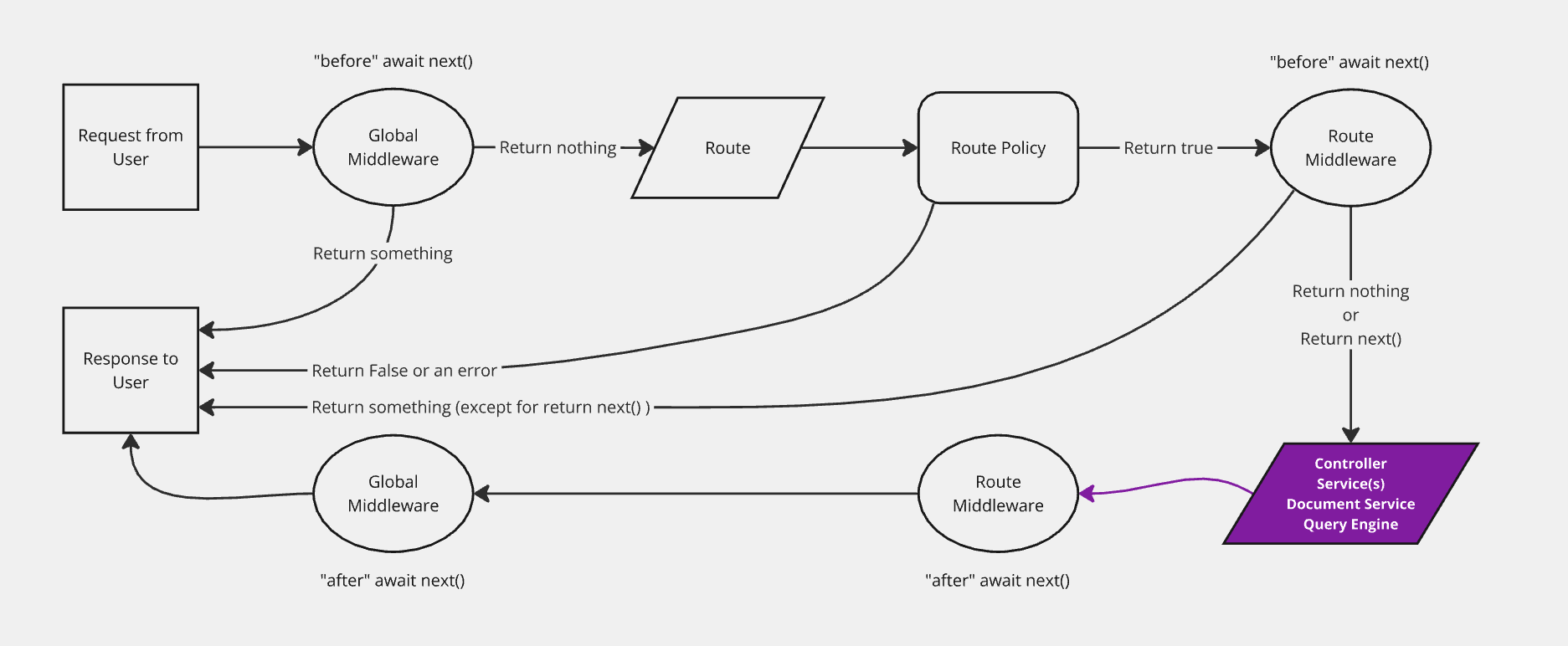
ミドルウェアの登録
構文: strapi.documents.use(middleware)
パラメータ
ミドルウェアは、context と next を受け取る関数です。
構文: (context, next) => ReturnType<typeof next>
| パラメータ | 説明 | 型 |
|---|---|---|
context | ミドルウェア用のコンテキスト | Context |
next | スタック内の次のミドルウェアを呼び出す | function |
context
| パラメータ | 説明 | 型 |
|---|---|---|
action | 実行中のメソッド(利用可能なメソッドを参照) | string |
params | メソッドのパラメータ(利用可能なメソッドを参照) | Object |
uid | コンテンツタイプの一意識別子 | string |
contentType | コンテンツタイプ | ContentType |
例:
呼び出すメソッドに応じて context に含まれる内容の例です。
- findOne
- findMany
- create
- update
- delete
{
  uid: "api::restaurant.restaurant",
  contentType: {
    kind: "collectionType",
    collectionName: "restaurants",
    info: {
      singularName: "restaurant",
      pluralName: "restaurants",
      displayName: "restaurant"
    },
    options: {
      draftAndPublish: true
    },
    pluginOptions: {},
    attributes: {
      name: { /*...*/ },
      description: { /*...*/ },
      createdAt: { /*...*/ },
      updatedAt: { /*...*/ },
      publishedAt: { /*...*/ },
      createdBy: { /*...*/ },
      updatedBy: { /*...*/ },
      locale: { /*...*/ },
    },
    apiName: "restaurant",
    globalId: "Restaurants",
    uid: "api::restaurant.restaurant",
    modelType: "contentType",
    modelName: "restaurant",
    actions: { /*...*/ },
    lifecycles: { /*...*/ },
  },
  action: "findOne",
  params: {
    documentId: 'hp7hjvrbt8rcgkmabntu0aoq',
    locale: undefined,
    status: "published",
    populate: { /*...*/ },
  }
}
{
  uid: "api::restaurant.restaurant",
  contentType: {
    kind: "collectionType",
    collectionName: "restaurants",
    info: {
      singularName: "restaurant",
      pluralName: "restaurants",
      displayName: "restaurant"
    },
    options: {
      draftAndPublish: true
    },
    pluginOptions: {},
    attributes: {
      name: { /*...*/ },
      description: { /*...*/ },
      createdAt: { /*...*/ },
      updatedAt: { /*...*/ },
      publishedAt: { /*...*/ },
      createdBy: { /*...*/ },
      updatedBy: { /*...*/ },
      locale: { /*...*/ },
    },
    apiName: "restaurant",
    globalId: "Restaurants",
    uid: "api::restaurant.restaurant",
    modelType: "contentType",
    modelName: "restaurant",
    actions: { /*...*/ },
    lifecycles: { /*...*/ },
  },
  action: "findMany",
  params: {
    filters: { /*...*/ },
    status: "draft",
    locale: null,
    fields: ['name', 'description'],
  }
}
{
  uid: "api::restaurant.restaurant",
  contentType: {
    kind: "collectionType",
    collectionName: "restaurants",
    info: {
      singularName: "restaurant",
      pluralName: "restaurants",
      displayName: "restaurant"
    },
    options: {
      draftAndPublish: true
    },
    pluginOptions: {},
    attributes: {
      name: { /*...*/ },
      description: { /*...*/ },
      createdAt: { /*...*/ },
      updatedAt: { /*...*/ },
      publishedAt: { /*...*/ },
      createdBy: { /*...*/ },
      updatedBy: { /*...*/ },
      locale: { /*...*/ },
    },
    apiName: "restaurant",
    globalId: "Restaurants",
    uid: "api::restaurant.restaurant",
    modelType: "contentType",
    modelName: "restaurant",
    actions: { /*...*/ },
    lifecycles: { /*...*/ },
  },
  action: "create",
  params: {
    data: { /*...*/ },
    status: "draft",
    populate: { /*...*/ },
  }
}
{
  uid: "api::restaurant.restaurant",
  contentType: {
    kind: "collectionType",
    collectionName: "restaurants",
    info: {
      singularName: "restaurant",
      pluralName: "restaurants",
      displayName: "restaurant"
    },
    options: {
      draftAndPublish: true
    },
    pluginOptions: {},
    attributes: {
      name: { /*...*/ },
      description: { /*...*/ },
      createdAt: { /*...*/ },
      updatedAt: { /*...*/ },
      publishedAt: { /*...*/ },
      createdBy: { /*...*/ },
      updatedBy: { /*...*/ },
      locale: { /*...*/ },
    },
    apiName: "restaurant",
    globalId: "Restaurants",
    uid: "api::restaurant.restaurant",
    modelType: "contentType",
    modelName: "restaurant",
    actions: { /*...*/ },
    lifecycles: { /*...*/ },
  },
  action: "update",
  params: {
    data: { /*...*/ },
    documentId: 'hp7hjvrbt8rcgkmabntu0aoq',
    locale: undefined,
    status: "draft",
    populate: { /*...*/ },
  }
}
{
  uid: "api::restaurant.restaurant",
  contentType: {
    kind: "collectionType",
    collectionName: "restaurants",
    info: {
      singularName: "restaurant",
      pluralName: "restaurants",
      displayName: "restaurant"
    },
    options: {
      draftAndPublish: true
    },
    pluginOptions: {},
    attributes: {
      name: { /*...*/ },
      description: { /*...*/ },
      createdAt: { /*...*/ },
      updatedAt: { /*...*/ },
      publishedAt: { /*...*/ },
      createdBy: { /*...*/ },
      updatedBy: { /*...*/ },
      locale: { /*...*/ },
    },
    apiName: "restaurant",
    globalId: "Restaurants",
    uid: "api::restaurant.restaurant",
    modelType: "contentType",
    modelName: "restaurant",
    actions: { /*...*/ },
    lifecycles: { /*...*/ },
  },
  action: "delete",
  params: {
    data: { /*...*/ },
    documentId: 'hp7hjvrbt8rcgkmabntu0aoq',
    locale: "*",
    populate: { /*...*/ },
  }
}
next
next は引数のない関数で、スタックの次のミドルウェアを呼び出し、その戻り値を返します。
例
strapi.documents.use((context, next) => {
  return next();
});
登録する場所
一般的に、ミドルウェアは Strapi の register フェーズで登録します。
アプリ利用者
アプリ直下の register() ライフサイクルで登録します。
/src/index.js|ts
module.exports = {
  register({ strapi }) {
    strapi.documents.use((context, next) => {
      // ここにロジック
      return next();
    });
  },

  // bootstrap({ strapi }) {},
  // destroy({ strapi }) {},
};
プラグイン開発者
プラグインの register() ライフサイクルで登録します。
/(plugin-root-folder)/strapi-server.js|ts
module.exports = {
  register({ strapi }) {
    strapi.documents.use((context, next) => {
      // ここにロジック
      return next();
    });
  },

  // bootstrap({ strapi }) {},
  // destroy({ strapi }) {},
};
ミドルウェアの実装
実装するときは、必ず next() の戻り値を返してください。
そうしないと Strapi アプリが壊れる可能性があります。
例
const applyTo = ['api::article.article'];

strapi.documents.use(async (context, next) => {
  // 特定のコンテンツタイプだけ対象
  if (!applyTo.includes(context.uid)) {
    return next();
  }

  // 特定のアクションだけ対象
  if (['create', 'update'].includes(context.action)) {
    context.params.data.fullName = `${context.params.data.firstName} ${context.params.data.lastName}`;
  }

  const result = await next();

  // 返す前に result を加工する
  return result;
});
ライフサイクルフック
Document Service API は、呼び出すメソッドに応じてさまざまなデータベースのライフサイクルフックを発火します。一覧は Document Service API: ライフサイクルフック を参照してください。